


Food Party AR
Let's play with Snap Chat.
Overview
01
Role in the Project
I was the leader of the project and primarily focused on developing most of the code and logic. After implementing the overall logic of the project, my colleagues provided designed objects and images, which we then used to create a complete game.
02
Brief Concept
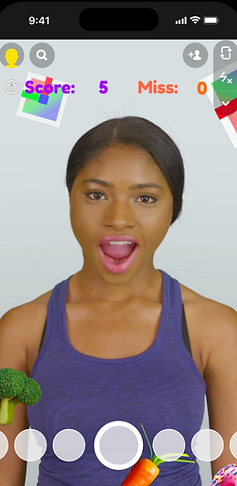
The game involves catching food objects that appear on the screen with your mouth to score points. There are also unhealthy objects; eating these will cause the camera to show your face swelling sideways. You have a total of three lives, and the game ends when all lives are depleted.

03
Lens Studio & Codes

This project was created using Lens Studio and runs on Snapchat. All logic is implemented through JavaScript code. Two types of cameras were used to enable a 3D player to detect 2D objects. The most crucial codes were for 'dropping food objects on the screen' and 'detecting collisions with the mouth'.
04
Game Design
All objects and UI that appear on the screen were created in 2D format. The game was designed with a Christmas theme, and the food objects to be caught were composed of items that evoke the Christmas spirit. There are a total of three stages, and in each stage, the positions and movement patterns of the objects vary.

User Journey
Objects falling


Objects are falling with rotation

Objects move side by side
-
When the start button is pressed, the game begins. Players earn points by eating healthy food objects that fall from the top of the screen.
-
When a certain score is reached, the game advances to Level 2, where objects start to rotate as they fall.
-
Upon reaching another specific score, the game moves to Level 3, where objects appear from the left and right sides and move to the opposite side. Eating unhealthy objects causes the player's face to stretch.
Key Features
01.
Mouth-Catching AR
02.
Randomly Appearing Objects
03.
Three Types of Stages
04.
Christmas Concept
Time Line
01
Phase 1 - Object appearing / Score System / Mouth-Catching
The core element of the game, 'object falling', was implemented first. Three types of objects are generated at random positions along the X-axis and fall downwards. The falling speed and reproduction rate were set differently to keep the game engaging. They were designed to collide with the player's mouth, and a scoring system was also integrated.
02
phase 2 - FaceStretch / Greasy image / Top Score
When the player catches a donut (an unhealthy food) with their mouth, a stretching effect is applied to the face. When the other two healthy foods are caught, the face returns to normal. If unhealthy food is eaten, a 'Greasy' image pops up, and a high score system has been implemented.

03
Phase3 - Stages / HP
Finally, three stages were designed. In the first stage, objects simply fall from above, while in the second stage, they rotate as they fall. In the third stage, objects appear randomly along the Y-axis and move left and right. Additionally, an HP system was built, and the game ends when all three Hp images are depleted. The game start and end screens were also implemented.


Playing Video
This video captures the final, completed version of the game, including game play footage. Pay special attention to the feature where eating a human-shaped cookie causes the face to stretch sideways and the characteristic movement of objects from side to side in level 3, as these are the key aspects of the game.
1
Score Systems
2
Object falling Randomly
3
Mouth Catching AR
4
HP (Heart Images) System
5
Greasy Images appear
6
Sound System

Contributions
My role was to make the game operational by coding and implementing logic for the images provided by my colleagues. I handled the entire coding process, from making game objects fall on the screen, catching them with the mouth, stretching the face when an object is eaten, to the scoring system.
Below is a selection of my code that encapsulates the core aspects.
Mouth Tracking
1. A game where you catch 2D objects with a 3D mouth.
2. Utilizes two cameras, one that recognizes player and the other that recognizes 2D images.
3. Since 2D images do not have a Z axis, an invisible 2D image is attached to the mouth using the 'head binding' function, and when touched, the objects disappear.


Movement of Objects
1. To make the game more fun, the on-screen movement of objects is varied for each level
2. The original concept was that objects would fall from top to bottom, but it was decided to add additional objects that move left and right.
3. Unlike the former, the latter has two starting points and need to appear randomly.

Face Stretch
1. We wanted to implement ‘Face Stretch’, where the face expands sideways every time the selected object is eaten.
2. In order to control whether the face stretches or shrinks sideways, it is necessary to increase and decrease the 'Feature0' value in the 'Face Stretch' function.
3. Changes to the value are implemented through code.


Reflections
Do you feel you met the initial goal of your project?
Sometimes, a project can turn out better or worse than initially planned. Originally, the concept for this project involved using a camera to highlight specific foods, then having the components of that food appear on the camera screen, with the game progressing based on these components. Implementing these two major concepts at once proved to be quite challenging, and ultimately, the game was developed based on predefined objects. I was satisfied to have successfully implemented the second concept, which was a major part of my initial vision.
What was the most challenging part of your experience?
I initially found it confusing to use JavaScript for the first time, but my experience with Unity (C#) helped me navigate through it. The most challenging part of the project was implementing a 3D human in the camera to catch 2D images with the mouth, which involved ignoring the Z-axis and led to many errors. Eventually, I resolved the issue by attaching the 2D images to the mouth using face tracking.
New Year! A New Life!
Decide today who you will become, what you will give how you will live.